Feeds and discovery
Every blog publishes RSS, Atom and JSON from the day you make it.
A feed is how someone follows your writing without an account, an algorithm, or an email address changing hands. They paste a URL into their reader; new posts turn up. Nobody in the middle decides what they see or when. It is the oldest working piece of the small web, and it needs no cooperation from a platform beyond publishing the file.
ULTRV publishes it. There is no plugin to add and no setting to switch on — the feeds exist as soon as the blog does.
The four URLs
Settings → Feeds lists them with a Copy button on each row. They hang off whatever your blog's address is — the free subdomain, or your custom domain once it is live:
RSS 2.0     https://yourblog.ultrv.blog/feed
Atom        https://yourblog.ultrv.blog/feed.atom
JSON Feed   https://yourblog.ultrv.blog/feed.json
OPML        https://yourblog.ultrv.blog/opml.xml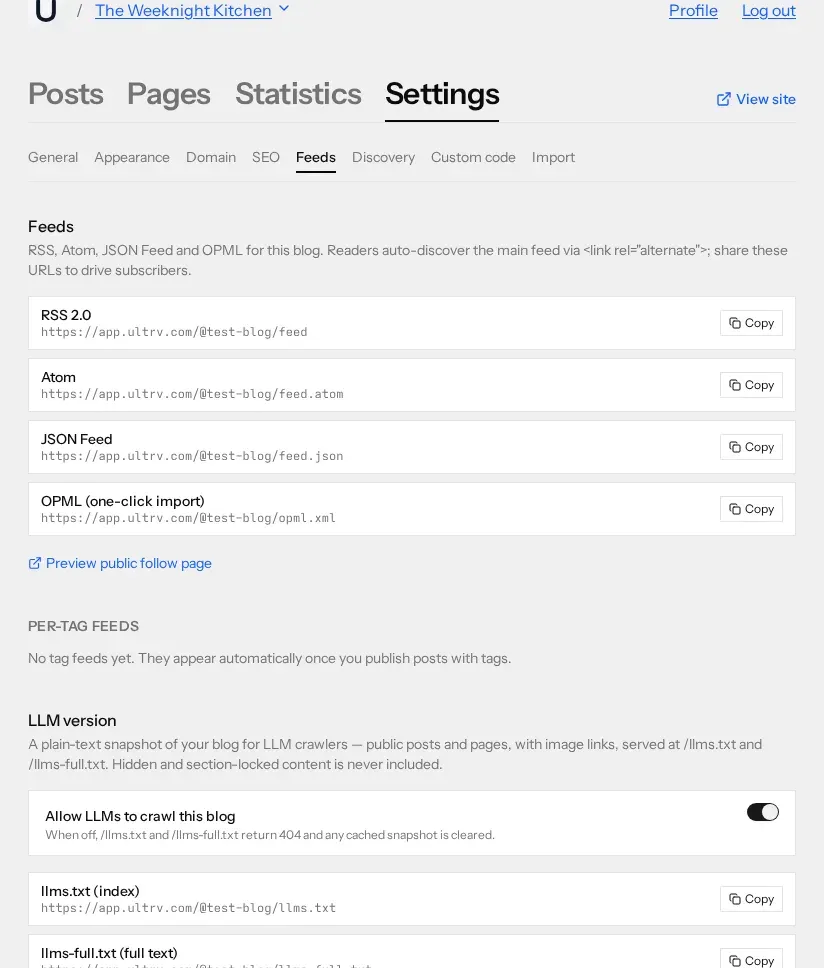
Three formats rather than one is not indecision. RSS is what almost every reader speaks, Atom is the stricter standard some tools prefer, and JSON Feed is the one that is pleasant to parse if you are writing code against it. They carry the same posts.
Auto-discovery
Most people will never type a feed URL. Every public page of your blog
carries
<link rel="alternate">
tags for all three formats, so a reader given nothing but your homepage
address finds the feed on its own. That is worth knowing when you tell
people how to subscribe: the answer is your blog's address, not a URL
ending in /feed.
Per-tag feeds
Every tag you use gets its own feed, in all three formats, at
/tags/<tag>/feed,
/tags/<tag>/feed.atom
and
/tags/<tag>/feed.json.
You do not create them. They appear in the Per-tag feeds section of the
Feeds tab automatically once you publish posts with tags, and until then
that section says so.
This is more useful than it first sounds on a blog that covers several unrelated things. Someone who came for the woodworking can subscribe to the woodworking and skip the rest, which is a better outcome than them unsubscribing from all of it.
OPML and the follow page
The OPML file is one document containing your main feed plus a Tags folder listing every tag feed. Readers import OPML in one step, so a person who wants the whole blog and the topic feeds gets them together rather than pasting URLs one at a time.
Alongside it, every blog has a public follow page — the Preview public follow page link on the Feeds tab opens it. It is a plain page you can send people to instead of explaining RSS: the feed URLs, one-click subscribe buttons for Feedly, Inoreader, NewsBlur and Feedbin, and a Mastodon handle via rss-parrot.net for readers who would rather follow from there.
A toggle at the bottom of the Feeds tab, Subscribe CTA at the bottom of each post, shows a small "Subscribe via RSS" block under every post, linking to that page. It is on to begin with, and one switch takes it away. It is also the only thing ULTRV will ever add to the bottom of your writing.
The LLM snapshot
The same tab carries a separate switch,
Allow LLMs to crawl this blog, which
publishes a plain-text snapshot of your public posts and pages at
/llms.txt
and
/llms-full.txt.
Hidden and section-locked content is never included. Turn it off and both
URLs return 404 and any cached snapshot is cleared. It is your call, and
it is a single switch either way.
Being found
Feeds serve people who already know you exist. Settings → Discovery is about the other problem.
The ULTRV web ring
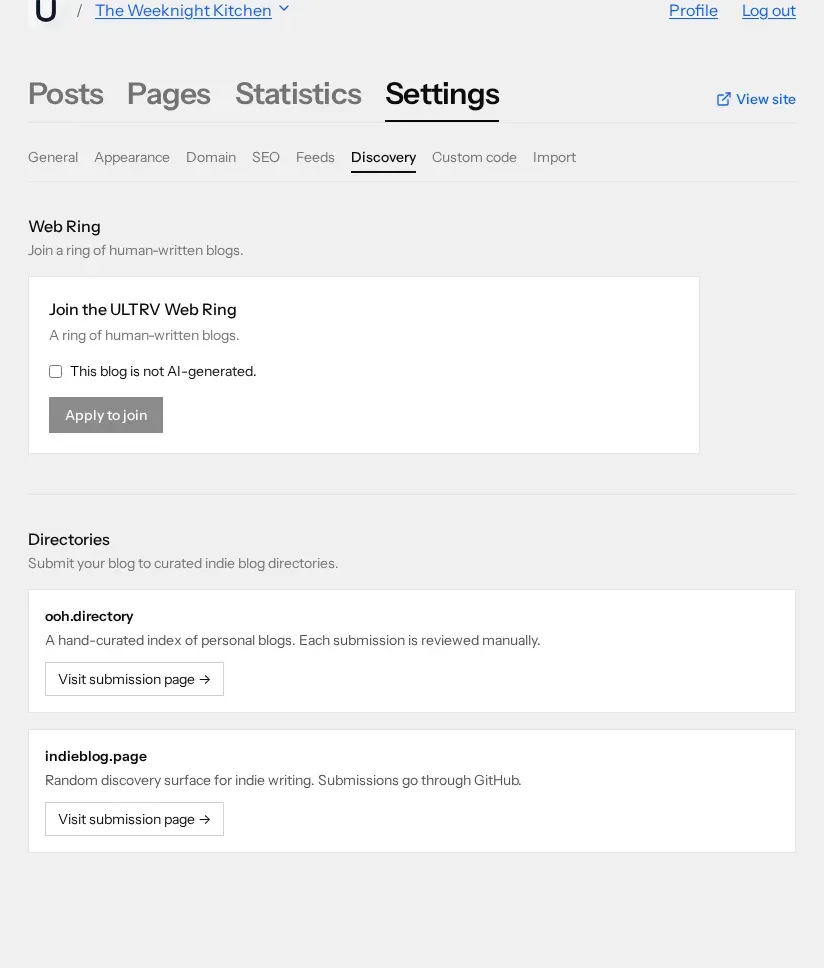
A web ring is a loop of sites that link to each other, so a reader on one can walk to the next without a search engine in between. The ULTRV ring is for human-written blogs. Joining means ticking This blog is not AI-generated and pressing Apply to join; applications are reviewed by hand rather than approved automatically, which is the point of it.
Once you are in, the panel tells you how many blogs are in the ring, a Show widget switch controls whether the previous/next/random links appear on your blog, and Leave the ring does exactly that. If an application is turned down you can apply again later.
Directories
The same page links out to two indie directories that are not ours: ooh.directory, a hand-curated index of personal blogs where each submission is reviewed manually, and indieblog.page, a random discovery surface for indie writing whose submissions go through GitHub. Both are worth a submission, and neither of them cares that you write on ULTRV.
Separately, the Make this blog discoverable switch on Settings → General decides whether your blog appears in public listings, including the explore directory, which is browsable by language. It is on when you create a blog. There is no ranking and no recommendation engine behind any of it — it is a list.
What none of this does
ULTRV does not send email. There is no newsletter, no subscriber list, and no open-rate pixel, which means there is also no list to leak and nothing to migrate if you leave. If your readers must arrive by email, this is the honest limitation to weigh up, and the Substack comparison says so at more length. What ULTRV gives you instead is a feed anyone can read, and an export that includes it.