Custom domains
Point a domain you own at your blog, and let the certificate sort itself out.
Every blog you make already has an address. When you
create a blog
you pick a slug, and the blog is served at
yourslug.ultrv.blog
over HTTPS from that moment. Nothing on this page is required. It is
for the case where you would rather the address were yours.
Why bother
A domain is the one part of a blog that survives the platform it sits
on. If you write at
example.com
for six years and then leave, the links people made still work, because
you can point that name somewhere else. If you write at someone else's
subdomain, they do not. That is the whole argument, and it is the same
argument the rest of the
small web
makes.
ULTRV does not sell domains. Buy one from any registrar, keep it there, and change a single record. Custom domains cost nothing on top of the free tier — there is no plan to upgrade to before you can use one.
Step 1: enter the domain
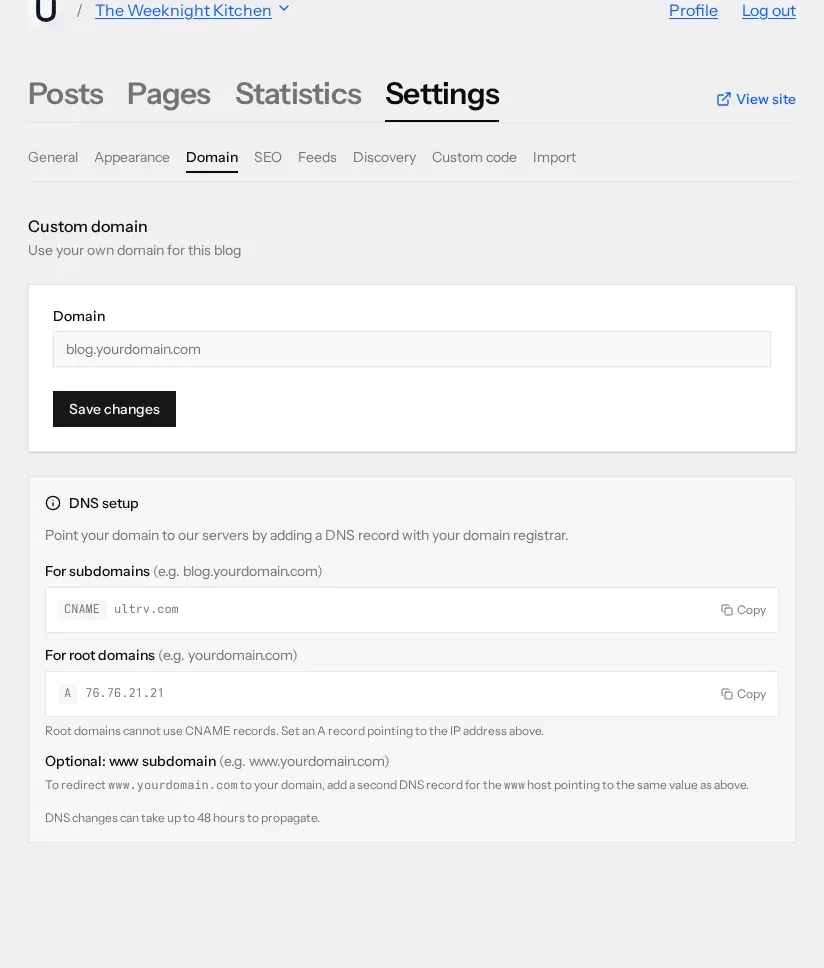
Open your blog, go to Settings → Domain,
type the domain into the Domain field, and
press Save changes. Enter the hostname
only — no https://,
no trailing slash.
Saving the domain does not break anything. The blog keeps serving on its
.ultrv.blog
subdomain the entire time, and the status shown under the field starts at
Waiting for DNS.
Step 2: add the DNS record
The record you add depends on whether you are using a subdomain or the root of the domain. Both values are printed on the Domain tab with a Copy button beside each one; copy them from there rather than typing them from memory, since that panel is always the current truth.
A subdomain — blog.yourdomain.com
Add a CNAME record at your registrar:
Type   CNAME
Host   blog
Value  ultrv.com
The host field is whatever your registrar calls the left-hand label —
blog
for blog.yourdomain.com,
notes
for notes.yourdomain.com,
and so on. Some registrars want the full hostname instead. Either is fine.
A root domain — yourdomain.com
Add an A record pointing at the IP address:
Type   A
Host   @
Value  76.76.21.21
Root domains cannot use a CNAME. This is a rule of DNS itself, not an ULTRV limitation: a CNAME says "everything about this name lives elsewhere", and the root of a zone already has to carry its own NS and SOA records, so the two cannot coexist. Some registrars paper over this with a feature called ALIAS or CNAME flattening. If yours does not, the A record above is the answer.
The optional www record
If you want www.yourdomain.com
to work as well, add a second record for the
www
host pointing at the same value as above. Requests to the www hostname
are permanently redirected to the bare domain, so you end up with one
canonical address rather than two copies of the blog.
Step 3: wait
There is no verify button to hunt for. ULTRV looks up the record every few minutes and moves the domain through three states, which appear on the same Domain tab:
- Waiting for DNS — the domain is saved, the record has not been seen yet.
- DNS verified — the record resolves to the right place, and the SSL certificate is being set up.
- Active — the domain is live with SSL, and a link to visit it appears next to the status.
DNS changes can take up to 48 hours to propagate. In practice most registrars publish in minutes, and the whole sequence — record saved, DNS verified, certificate issued — is usually over well inside an hour.
You do not buy, upload, or renew a certificate. It is requested for the domain once DNS verifies and renewed after that without you being involved.
What changes once it is active
The custom domain becomes the blog's canonical address. Post URLs, the
RSS, Atom and JSON feed URLs,
the OPML file, and the sitemap all switch to it. The old
.ultrv.blog
subdomain keeps working, so old links do not break.
One thing worth doing at this point: if anyone is subscribed to the old feed URL, mention the new one in a post. Feed readers follow the URL they were given, not the canonical you would prefer.
When it does not work
Nearly every failure is one of four things, and the status message on the Domain tab will read DNS does not point to our server. Please check your DNS settings and try again. for all of them.
- The record is not published yet.
Look the name up yourself —
dig blog.yourdomain.comor any web-based DNS lookup. If your own lookup does not see the record, neither will we. Wait, then check again. - The record type is wrong. A CNAME on a root domain will either be rejected by the registrar or quietly fail. Root domains take the A record; subdomains take the CNAME.
- The domain was saved but DNS was never changed. Entering the domain in ULTRV tells us which blog to serve. It does not reach into your registrar. Both halves are required.
- Something is proxying the record. If your DNS provider hides the record behind its own proxy, a lookup returns the proxy's address rather than the value you entered, and the check cannot match it. Turn the proxying off for that record.
Nothing is lost while you sort this out. Clear the field and save to go back to the subdomain, or fix the record and let the next check pick it up.
Common questions
Do I need to pay extra for a custom domain?
No. Custom domains are included at no extra cost on the free tier, alongside the .ultrv.blog subdomain every blog gets. No credit card is required to point a domain at an ULTRV blog.
Can I use a domain I already own?
Yes. ULTRV does not sell or register domains, so you bring one you already have. Buy it wherever you like, leave it with your existing registrar, and change one DNS record to point it here.
How long does DNS take to work?
DNS changes can take up to 48 hours to propagate, though most registrars are considerably faster. ULTRV re-checks your records every few minutes, so there is nothing to press once the record is saved.
Do I have to buy an SSL certificate?
No. Once your DNS verifies, a certificate is issued and renewed for you. There is nothing to upload, configure, or pay for, and the domain status changes to Active when the certificate is live.
Once the domain is live, the two things most people do next are pick a theme and check that their export works, so that the domain and the writing can both leave together if they ever need to.