Migrating from Substack to ULTRV
Request the export, upload the zip, and read what actually arrived.
Substack's export is a zip, and it is more honest than most: your posts are in there as real HTML files, indexed by a spreadsheet. ULTRV's Substack connector reads that spreadsheet as its manifest and pairs each row with its HTML file. The result is your archive, on a domain you control, with no newsletter attached.
Read the trade-off first, because it is a real one: ULTRV does not send email and has no paid subscriptions. If your Substack is a business, this is a downgrade in capability, and the Substack alternative comparison lays out exactly what you would be giving up.
Step one: export from Substack
In your publication's Settings, open Exports and choose Create new export. Substack builds the archive in the background and makes it downloadable from the same screen when it is ready; on a large publication that takes a while. (Path checked August 2026 against Substack's own support documentation.)
What you get is a zip containing posts.csv,
a posts/ folder with one HTML file per
post, your email list, and some per-post statistics. Do not unzip it and
do not rearrange it — ULTRV expects the layout Substack produced, and
the first thing it checks is that
posts.csv is sitting where it should be.
Step two: upload it to ULTRV
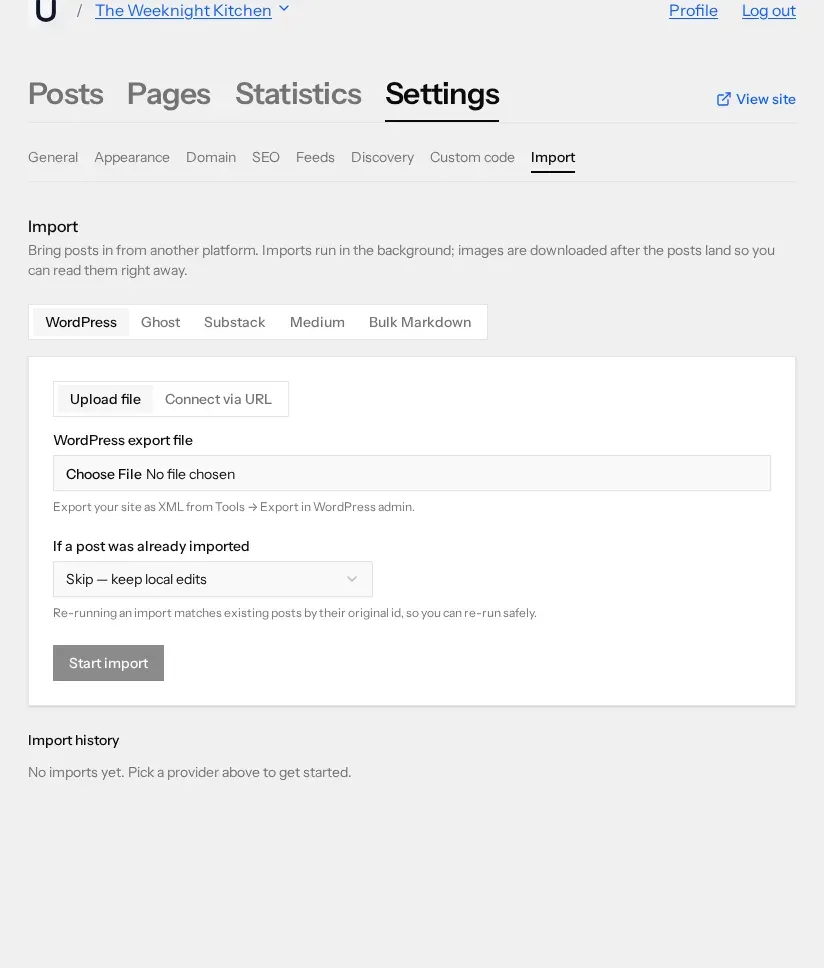
Make a blog, then open its Settings → Import and pick the Substack tab, third along the row. There is no "connect via URL" option here — Substack has no API to read from, so the zip is the only route. Choose the file, decide what should happen if a post has already been imported, and press Start import. Uploads are capped at 50 MB, which is generous for an archive that carries no images.
What maps, and what does not
Each row of the manifest becomes a post, carrying:
- The title, and the subtitle as the excerpt. Substack's subtitle is the one-line deck under the headline; ULTRV uses it as the post excerpt.
- The body. Read from the post's HTML file in the zip.
- The slug. Taken from the filename Substack used, so the readable half of the URL survives.
- Published or draft, and the date. Driven by the export's is_published flag; drafts arrive as drafts with no publication date.
- Inline images. Downloaded from Substack's servers and re-hosted, then relinked in the post.
- The Substack post id. Kept invisibly, which is what makes a second run of the same import safe.
What stays behind:
- Your subscriber list, and everything downstream of it: email delivery, paid tiers, Stripe, comps, and gift subscriptions.
- Comments, Notes, chat threads, likes, and restacks.
- Sections. Substack sections do not become ULTRV tags — every post arrives untagged, and you tag them yourself afterwards.
- Cover images, as cover images. If the picture also appeared in the body it comes across as an inline image; if it only ever appeared above the headline, it does not.
- Podcast audio and video. ULTRV hosts images, not media files.
- Paywall settings. A post that was paid-subscribers-only arrives as an ordinary post, fully readable. Check that this is what you want before you publish.
- Tables and embeds. Imported HTML is sanitised down to headings, paragraphs, lists, links, images, blockquotes, code, and emphasis.
After the import
The import history polls while the job runs and then reports how many
posts landed. Compare that number with your Substack archive: if it is
short, the missing pieces are rows Substack left out of
posts.csv, not posts ULTRV dropped.
Then, in this order:
- Open your two or three most-read posts and read them end to end. Long posts with pull quotes and buttons are where Substack's markup differs most from plain prose.
- Check anything that was behind the paywall, and set it back to draft if you would rather it stayed private.
- Wait a few minutes and reload a picture-heavy post. Images are fetched after the text lands.
- Add tags. Nothing arrives tagged, and per-tag feeds are the closest thing ULTRV has to Substack's sections.
If the result is not worth keeping, every batch in the import history has a rollback that deletes the posts and images it created and leaves the rest of the blog alone. Fix the file, run it again.
Your old URLs, and the readers on them
Substack posts live at /p/slug. On ULTRV
the same post sits at /slug, under
yourblog.ultrv.blog or under a
custom domain, which costs nothing
on ULTRV. Neither platform will redirect the old addresses for you.
The workable version of a Substack migration is therefore: import, get the new blog right, then publish one last Substack post that says where you have gone and links to the new feed. Leave the old publication standing rather than deleting it. Readers who subscribed by email are the ones you cannot take with you — asking them once, in a post they will actually receive, is the whole of your leverage.
Frequently asked questions
Do my Substack subscribers come across?
No. The export zip contains your email list, but ULTRV does not read it and has no email delivery, no subscriber management, and no paid subscriptions. ULTRV publishes RSS, Atom, and JSON feeds instead. If sending email to a list is central to what you do, ULTRV is the wrong tool and the comparison page says so plainly.
Are drafts included in a Substack export?
Whatever appears in posts.csv is what ULTRV imports. Each row carries an is_published flag: rows marked true arrive published with their original date, rows marked false arrive as drafts with no date. Anything Substack leaves out of the export cannot be imported, so check the post count in the import history against your archive.
What happens to my substack.com URLs?
Substack posts live at /p/slug. On ULTRV the same post is at /slug, with no /p/ prefix, under your .ultrv.blog subdomain or your own domain. ULTRV does not serve redirects for the old addresses, and Substack does not let you set them either, so post a final note on the Substack pointing at the new home and leave it up.
Do images survive the move off Substack?
Yes, provided the publication is still up while the import runs. The export zip contains no image files — the HTML links back to Substack. ULTRV downloads each inline image, stores its own copy, and rewrites the link, so nothing depends on Substack afterwards. Images arrive a few minutes behind the text.
Free, no credit card. Import first, decide later — the Substack stays exactly where it is until you delete it.